
A multiplication chart is a grid that shows the answer to every multiplication fact in one place: find a number on the left, find a number on the top, and the box where the row and column meet is the product. Our free multiplication chart maker below lets you make a 1–12, 1–20 or custom chart up to 30 × 30, switch to a blank or missing-number practice chart, highlight square numbers or a single times table, and print it or save it as a PDF with an answer key. It works on phones, tablets and computers, with no sign-up.
Quick start: pick a chart size, choose “Filled”, “Blank”, “Missing numbers” or “Half chart”, then press Print / Save as PDF. Tap any box to see the fact it shows (for example, row 7 × column 8 = 56).
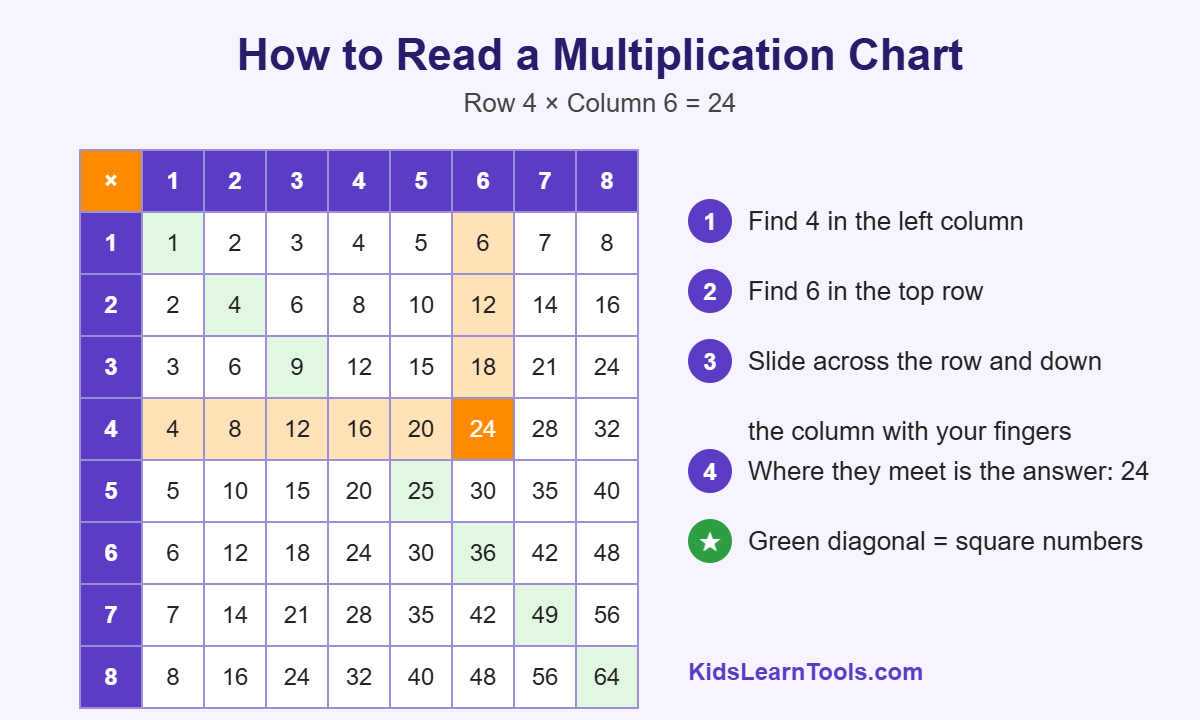
Table of Contents
- What Is a Multiplication Chart?
- How to Read a Multiplication Chart (Step by Step)
- How to Use the Multiplication Chart Maker
- Which Multiplication Chart Should I Print?
- Types of Multiplication Charts You Can Make
- Printable 12 × 12 Multiplication Chart (Text Version)
- Patterns Kids Can Find on a Multiplication Chart
- How to Use a Multiplication Chart for Division
- From Filled to Blank: A Step-by-Step Practice Plan
- From My Classroom
- Tips for Parents and Teachers
- Fun Multiplication Chart Activities
- Printing Tips for the Best Results
- Why Use an Online Multiplication Chart Maker?
- Frequently Asked Questions
- Final Thoughts
What Is a Multiplication Chart?
A multiplication chart (also called a times table chart or multiplication grid) is a square table of numbers. The top row and the left column are the factors, and each box inside holds the product of its row number and column number. A standard 12 × 12 multiplication chart has 144 answer boxes and covers every fact from 1 × 1 = 1 to 12 × 12 = 144.
In simple words: a multiplication chart is a “cheat sheet” that kids use while they are still learning their times tables. Over time, they lean on it less and less until the facts are memorized.
Multiplication chart vs times table: what is the difference?
The two words are often used for the same thing, but there is a small difference. A times table is one list of facts for a single number, such as the 6 times table (6, 12, 18, 24 …). A multiplication chart puts all the times tables together in one grid, so every row is one times table and every column is one times table too.
How to Read a Multiplication Chart (Step by Step)
Kids can learn to read the chart in under a minute. Use this example: 4 × 6.
- Find the first number, 4, in the left column (the row headers).
- Find the second number, 6, in the top row (the column headers).
- Slide one finger across the row and another finger down the column.
- The box where your fingers meet is the answer: 24.
- Check it the other way: row 6, column 4 is also 24, because the order of factors does not change the product.
You can try this right now in the tool above. Tap the box for 4 × 6 and the row and column light up in orange so kids can see exactly how the chart “works”.
How to Use the Multiplication Chart Maker
- Choose a chart size. Pick 1–10, 1–12, 1–15, 1–20, 1–25, 1–30 or set your own rows and columns.
- Choose where to start. Start from 1 (most common) or from 0 to include the zero facts.
- Pick a chart type. Filled, blank, missing numbers (easy, medium or hard), or a half chart.
- Add a highlight (optional). Show square numbers, one times table, or all multiples of a number.
- Name your sheet. Type a title such as “7 Times Table Practice” and keep or remove the name and date line.
- Print or save. Press Print / Save as PDF. Practice charts print the answer key on page 2.
Press New Blanks to get a fresh missing-number chart in one click, so every child in a class (or every day of the week) can have a different practice sheet.
Which Multiplication Chart Should I Print?
The right chart depends on the child’s grade and goal. This quick guide matches each chart to the skill it supports.
| Chart | Facts shown | Best for | Typical grade |
|---|---|---|---|
| 1–10 (10 × 10) | 100 facts, products up to 100 | First look at multiplication, arrays, skip counting | Grade 2–3 |
| 1–12 (12 × 12) | 144 facts, products up to 144 | Learning and memorizing the times tables | Grade 3–4 |
| 1–15 (15 × 15) | 225 facts | Extra challenge, mental math | Grade 4–5 |
| 1–20 (20 × 20) | 400 facts, products up to 400 | Bigger facts, square numbers to 400, factors | Grade 5+ |
| 1–30 (30 × 30) | 900 facts | Factor hunting, patterns, enrichment | Grade 5–6 |
| Blank chart | Only the headers | Filling in from memory, quick fact checks | Grade 3+ |
| Missing numbers | 25%, 50% or 75% blank | Daily practice with a built-in answer key | Grade 3+ |
Note on “multiplication chart 1–100”: many parents search for this, and it usually means the 10 × 10 chart, whose answers go from 1 to 100. Choose “1–10 (10 × 10, products to 100)” in the tool to get it.
Types of Multiplication Charts You Can Make
Filled multiplication chart (1–12)
The classic printable multiplication chart with every answer filled in. Keep it in a folder, tape it to a desk, or put it on the fridge as a reference while kids do homework.
Blank multiplication chart
Only the row and column numbers are shown. Kids fill in every box themselves. A blank multiplication chart is one of the best ways to check what a child really knows, and it builds the chart in their mind as they write.
Missing number multiplication chart
Some boxes are blank and some are filled. Easy mode hides about a quarter of the answers, medium hides half, and hard hides three quarters. Because the filled boxes act as clues, this is a gentle step between the full chart and the blank chart.
Half multiplication chart
Only one side of the diagonal is shown. This teaches the commutative property: 3 × 8 and 8 × 3 have the same answer, so kids only need to learn about half of the chart.
Multiplication chart 1–20 and larger charts
A 20 × 20 multiplication chart helps older kids with larger facts, square numbers up to 400, and finding factors. Charts up to 30 × 30 print in a smaller font so they still fit on one page.
Highlighted charts: squares, one table or multiples
Turn on a highlight to make patterns jump out. “One times table” colors a single row and column (great for the table you are studying this week). “Multiples of a number” colors every product that can be divided by that number.
Printable 12 × 12 Multiplication Chart (Text Version)
Here is the full 1–12 multiplication chart as a simple table. It is easy to read on any screen and helpful for quick look-ups.
| × | 1 | 2 | 3 | 4 | 5 | 6 | 7 | 8 | 9 | 10 | 11 | 12 |
|---|---|---|---|---|---|---|---|---|---|---|---|---|
| 1 | 1 | 2 | 3 | 4 | 5 | 6 | 7 | 8 | 9 | 10 | 11 | 12 |
| 2 | 2 | 4 | 6 | 8 | 10 | 12 | 14 | 16 | 18 | 20 | 22 | 24 |
| 3 | 3 | 6 | 9 | 12 | 15 | 18 | 21 | 24 | 27 | 30 | 33 | 36 |
| 4 | 4 | 8 | 12 | 16 | 20 | 24 | 28 | 32 | 36 | 40 | 44 | 48 |
| 5 | 5 | 10 | 15 | 20 | 25 | 30 | 35 | 40 | 45 | 50 | 55 | 60 |
| 6 | 6 | 12 | 18 | 24 | 30 | 36 | 42 | 48 | 54 | 60 | 66 | 72 |
| 7 | 7 | 14 | 21 | 28 | 35 | 42 | 49 | 56 | 63 | 70 | 77 | 84 |
| 8 | 8 | 16 | 24 | 32 | 40 | 48 | 56 | 64 | 72 | 80 | 88 | 96 |
| 9 | 9 | 18 | 27 | 36 | 45 | 54 | 63 | 72 | 81 | 90 | 99 | 108 |
| 10 | 10 | 20 | 30 | 40 | 50 | 60 | 70 | 80 | 90 | 100 | 110 | 120 |
| 11 | 11 | 22 | 33 | 44 | 55 | 66 | 77 | 88 | 99 | 110 | 121 | 132 |
| 12 | 12 | 24 | 36 | 48 | 60 | 72 | 84 | 96 | 108 | 120 | 132 | 144 |
Patterns Kids Can Find on a Multiplication Chart
A multiplication chart is not only for looking up answers. It is full of patterns, and spotting them is what turns memorizing into understanding.
| Pattern | What kids notice | Why it helps |
|---|---|---|
| Mirror image | The chart is the same on both sides of the diagonal (3 × 7 = 7 × 3) | Cuts the facts to learn almost in half |
| Square numbers | The diagonal shows 1, 4, 9, 16, 25, 36 … | Builds number sense for area and later algebra |
| The 2s row | All answers are even numbers | Doubling is an easy strategy |
| The 5s row | Answers end in 5 or 0 | Links to counting money and telling time |
| The 9s row | The digits of each answer add up to 9 (18 → 1 + 8) | A quick self-check for the 9 times table |
| The 10s row | Add a zero to the number | The easiest table and a great confidence boost |
| The 11s row | Up to 9 × 11 the digit repeats (11, 22, 33 …) | Fun and memorable |
| Rows add up | The 6 row = the 2 row + the 4 row | Use easy facts to solve hard facts |
How many facts do kids really need to memorize?
A 12 × 12 chart has 144 boxes, but thanks to the mirror pattern there are only 78 different fact pairs. Take away the 1s, 2s, 5s and 10s, which most kids learn quickly from skip counting, and only about 36 “hard” facts are left. Showing children this number is a big confidence boost: the job is much smaller than it looks.
How to Use a Multiplication Chart for Division
Division is the opposite of multiplication, so the same chart works backwards. Example: 42 ÷ 6.
- Find the divisor, 6, in the left column.
- Move along row 6 until you find 42.
- Go straight up to the top row. The number there, 7, is the answer.
- Check: 6 × 7 = 42.
This makes the chart useful well beyond Grade 3. Kids can use it for division facts, simplifying fractions and finding common multiples.
From Filled to Blank: A Step-by-Step Practice Plan
Kids learn the times tables best in small, steady steps. Here is a simple four-week plan that uses the different chart types from the maker.
| Week | Chart to print | Daily activity (10 minutes) |
|---|---|---|
| Week 1 | Filled 1–10 chart + highlight “one times table” | Skip count one table aloud, then find 5 facts on the chart |
| Week 2 | Half chart | Talk about the mirror pattern; fill in 10 missing facts from memory |
| Week 3 | Missing numbers – easy, then medium | Fill the blanks, check with the answer key, circle the ones that were tricky |
| Week 4 | Blank 1–12 chart | Time how long it takes to fill the whole chart; try to beat it next day |
Tip: before starting multiplication, make sure kids are comfortable with skip counting. Each row of the multiplication chart is really a skip counting sequence, and the hundreds chart maker is a great way to practice it first.
From My Classroom
In my eight years of teaching in schools and colleges, I mostly worked with slow learners, and the multiplication chart was one of the tools I trusted most. Many of my students felt anxious the moment they saw a page of times tables. The chart changed that. Instead of being tested, they were allowed to “look it up”, and this simple permission lowered the fear and let them start working.
I never treated the chart as cheating. We used it like training wheels. First, students read answers straight from a full chart. Next, they used a half chart and discovered that 4 × 9 and 9 × 4 give the same answer, which always brought a smile because the task suddenly felt smaller. Then I gave them charts with a few blank boxes, and slowly we increased the blanks. Each step was small enough that every child could succeed.
Peer groups also worked well. I paired a confident student with a child who needed more support, and they took turns asking each other facts and finding the answers on the chart. Students who struggled often remembered the facts better when a friend explained a pattern, like “the 9s always add up to 9”, than when I explained it. By the time we reached the blank chart, most of them could fill in rows they once avoided, and that confidence carried into the rest of their math work.
Tips for Parents and Teachers
- Start with the easy tables. Learn the 1s, 2s, 5s and 10s first. These cover more than half of the chart.
- One table a week is enough. Use the “one times table” highlight to focus on a single row and column.
- Say it out loud. Reading facts aloud (“seven times eight is fifty-six”) helps memory more than silent reading.
- Keep sessions short. Ten focused minutes a day beats one long session a week.
- Use the answer key for self-checking. Kids learn more when they find and fix their own mistakes.
- Praise effort, not speed. Speed comes later. Accuracy and confidence come first.
- Mix in games. Use the Quick Practice box in the tool, or try our math quiz for kids for variety.
Fun Multiplication Chart Activities
- Chart detective: Call out an answer (like 36) and ask kids to find every box where it appears (4 × 9, 6 × 6, 9 × 4, 3 × 12, 12 × 3).
- Color the pattern: Print a blank chart in black and white and color all the even products one color and the odd products another.
- Race the clock: Fill in a missing-number chart and time it. Try to beat your own best time, not a classmate’s.
- Make an anchor chart: In class, enlarge the chart and add sticky notes with tips (for example, “9s add up to 9”). This makes a simple multiplication anchor chart for the wall.
- Fact of the day: Highlight one box on the chart each morning and use it in a word problem.
Want more printable practice? Make addition, subtraction and multiplication sheets with our math worksheet generator, or try a fun color by number page as a reward.
Printing Tips for the Best Results
- Choose “Save as PDF” as the printer in the print window to keep a digital copy.
- For 20 × 20 and larger charts, set the paper to landscape and scaling to “Fit to page”.
- Turn on Black and white to save colored ink.
- Laminate a filled chart or slip it into a plastic sleeve so kids can reuse it with a dry-erase marker.
- If the print window does not open, allow pop-ups for this site and try again.
Why Use an Online Multiplication Chart Maker?
Ready-made PDF charts are fixed: one size, one style. With an online multiplication chart maker you can make exactly the chart a child needs today, whether that is a 7 × 7 chart for a beginner, a 20 × 20 chart for an advanced learner, or a new missing-number sheet for every day of the week. You also get an interactive chart on screen, so kids can tap a box and see the fact, which helps them understand how rows and columns work before they print.
Learning multiplication facts to 10 × 10 is a key Grade 3 goal in many curriculums, including the US Common Core standard 3.OA.C.7, which asks students to know from memory all products of two one-digit numbers by the end of Grade 3. A multiplication chart is one of the simplest tools to reach that goal.
Frequently Asked Questions
What is a multiplication chart?
A multiplication chart is a grid that shows the products of numbers. The factors are along the top row and the left column, and each box holds the answer where a row and column meet. A standard chart goes from 1 × 1 to 12 × 12.
How do you read a multiplication chart?
Find the first number in the left column and the second number in the top row. Follow the row across and the column down. The box where they meet is the answer. For example, row 4 and column 6 meet at 24.
Is this multiplication chart maker free?
Yes. The multiplication chart maker on KidsLearnTools.com is 100% free to use and print at home or in the classroom, with no sign-up.
What is a multiplication chart 1–100?
It usually means a 10 × 10 multiplication chart, where the answers go from 1 to 100. Choose the “1–10” size in the tool to make it.
How do I print a blank multiplication chart?
Choose “Blank chart” as the chart type and press Print / Save as PDF. Keep “Print answer key on page 2” ticked if you also want a filled chart for checking.
Can I make a multiplication chart up to 20 or 30?
Yes. Choose 1–20, 1–25 or 1–30 from the size menu, or set custom rows and columns from 1 to 30.
How do you use a multiplication chart for division?
Find the divisor in the left column, move along that row to the number you are dividing, then go up to the top row. The number at the top is the answer. For example, 42 ÷ 6 = 7.
At what age should kids learn multiplication tables?
Most kids start multiplication around age 7–8 (Grade 2–3) and aim to know the facts to 10 × 10 by about age 8–9. Many schools then extend practice to 12 × 12 in Grade 4.
Final Thoughts
A multiplication chart is one of the simplest and most powerful tools for learning the times tables. Start with a filled chart, move to a half chart and missing-number practice, and finish with a blank chart filled from memory. Use the free multiplication chart maker above to make the right chart for your child or class in seconds, and explore more free learning tools for kids on KidsLearnTools.com.