
A hundreds chart is a 10 by 10 grid that shows the numbers 1 to 100 in order, ten numbers in each row. Kids use it to count to 100, skip count, find number patterns and add or subtract by tens. Use the free hundreds chart maker below to make a printable 100 chart, a 120 chart, a blank chart, a missing numbers worksheet or a cut-apart puzzle, then print it or save it as a PDF.
I built this tool from my 8 years of teaching in schools. Most hundreds chart pages give you one fixed PDF. Here you choose the numbers, the style and the colors, tap squares to color them in, and print a matching answer key, all for free and without signing up.
Make Your Free Printable Hundreds Chart
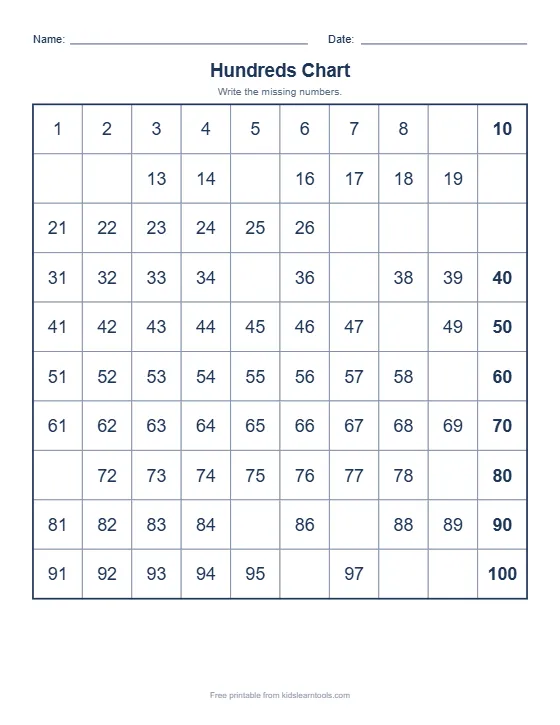
Easy hides about 1 in 5 numbers. Hard hides 7 in 10.
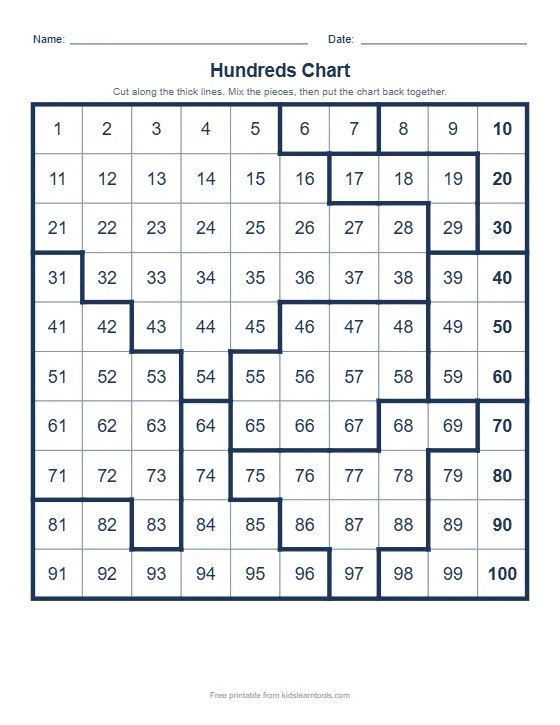
Thick lines show where to cut. Kids put the chart back together.
Bottom-up charts help kids see that numbers get bigger as they go up.
Everything happens in your browser. Nothing is sent or saved.
Your colored squares and hidden numbers are printed too. Tap a colored square again to remove the color.
How to Make a Printable Hundreds Chart
You can make a custom 100 chart in less than a minute:
- Choose the numbers. Pick 1 to 100, 0 to 99, 1 to 120, 101 to 200, or 1 to 50 for beginners.
- Choose a chart style. Pick a full chart, missing numbers, a blank chart, skip counting, odd and even, or a cut-apart puzzle.
- Set the layout. Put 1 in the top row or the bottom row, choose color or black and white, and change the title if you like.
- Mark it (optional). Tap any square to color it, or switch to “Hide the number” to make your own fill-in squares.
- Print or save. Click “Print or save as PDF”. For worksheets, an answer key prints as a second page. You can also download the chart as an image or show it full screen on a classroom board.
Types of Hundreds Charts You Can Make
Each chart type in this generator practices a different math skill. Use this table to pick the right one.
| Chart type | What it looks like | Skill it builds |
|---|---|---|
| Full hundreds chart | All numbers 1 to 100, with the tens column in bold | Counting to 100, reading two-digit numbers |
| Missing numbers | Some squares are empty (Easy, Medium or Hard) | Number order, counting on, finding patterns |
| Blank hundreds chart | An empty 10 by 10 grid, with an optional first number in each row | Writing numbers to 100 from memory |
| Skip counting chart | Multiples of 2, 3, 4, 5, 10 and more are shaded, or left blank to fill in | Skip counting, early multiplication |
| Odd and even chart | Even numbers shaded, odd numbers white | Odd and even numbers, counting by 2s |
| Cut-apart puzzle | Thick cut lines split the chart into 6, 10 or 16 pieces | Place value, number sense, problem solving |
| 120 chart | Numbers 1 to 120 in 12 rows | Counting past 100 (a first grade goal) |
| 0 to 99 chart | Starts at 0, so every row begins with the same tens digit | Place value (tens and ones) |
Why Is a Hundreds Chart Important?
A hundreds chart turns the numbers to 100 into a picture kids can see. Instead of a long list, the numbers sit in neat rows of ten, so patterns jump out. A hundreds chart helps kids:
- Count to 100 and start counting from any number, not only from 1.
- See place value. Every number in a column ends in the same digit, and every row shares the same tens digit.
- Add and subtract 10 quickly. One square down is 10 more, and one square up is 10 less.
- Skip count by 2s, 5s and 10s, which leads straight into multiplication.
- Spot patterns such as odd and even numbers and diagonal lines.
12 Hundreds Chart Activities for Kids
A hundreds chart printable is more than a poster. Here are 12 simple activities you can do with the charts from this tool.
Counting and number order
- Count and point. Your child points to each number while counting from 1 to 100. Start with one row a day.
- Start anywhere. Name a number such as 37 and ask your child to count on to 50.
- Missing numbers. Print an Easy missing numbers worksheet and fill in the blanks. Move to Medium and Hard as your child gets faster.
- Write the whole chart. Use the blank hundreds chart. Turn on “first number in each row” for extra help.
Skip counting and patterns
- Color the 5s. Print a skip counting chart by 5s and read the shaded numbers out loud.
- Find the hidden pattern. Hide the skip counting numbers and let your child write them in.
- Odd and even. Use the odd and even chart, then ask: “What do all the even numbers end with?”
- Color your own pattern. Tap squares in the tool to color a pattern, such as every 3rd number, then print it.
Adding, subtracting and place value
- 10 more, 10 less. Put a coin on 45. Move down one row (55) and up one row (35). Talk about what changed.
- Jump to add. To solve 23 + 12, start at 23, jump down one row (33), then move 2 squares right (35).
- Hundreds chart puzzle. Print a cut-apart puzzle on card paper, cut along the thick lines and rebuild the chart.
- Mystery number game. Hide one number with the tool. Give clues such as “It is 10 more than 46” until your child finds it.
Which Grade Uses a Hundreds Chart?
Hundreds charts are used most from kindergarten to second grade. In the US Common Core standards, kindergarten kids learn to count to 100 by ones and by tens (K.CC.A.1), first graders count to 120 starting at any number (1.NBT.A.1), and second graders skip count by 5s, 10s and 100s within 1,000 (2.NBT.A.2). Use this table to pick a chart for your child.
| Age / grade | Main goal | Chart to try |
|---|---|---|
| Preschool (age 4) | Count to 20 or 30 and recognize numbers | 1 to 50 chart, full, in color |
| Kindergarten (age 5 to 6) | Count to 100 by ones and tens | Full 1 to 100 chart, then Easy missing numbers |
| 1st grade (age 6 to 7) | Count to 120, add and subtract 10 | 120 chart, Medium missing numbers, puzzles |
| 2nd grade (age 7 to 8) | Skip count, odd and even, place value | Skip counting chart, odd and even chart, 101 to 200 chart |
Hundreds Chart vs 120 Chart: Which Is Better?
Both charts work well, and the right one depends on your child’s grade. A hundreds chart (1 to 100) is the best place to start, because it is a complete 10 by 10 square and easy to read. A 120 chart adds two more rows, so kids see what comes after 100 (101, 102 and so on). Many first grade teachers switch to the 120 chart because first grade goals go up to 120.
The 0 to 99 chart is a third option. Because it starts at 0, every number in a row has the same tens digit (20 to 29, 30 to 39), which makes place value even clearer.
Top-Down or Bottom-Up Hundreds Chart?
The usual hundreds chart puts 1 in the top left corner. A bottom-up hundreds chart puts 1 in the bottom left, so the numbers climb as they get bigger, like a ladder or a building. Some teachers like the bottom-up chart because “going up” means “more”. Try both with the “Where does 1 go?” option and use the one your child understands best.
From My Classroom: Learning Math Through Hands-On Activities
During my teaching experience, I learned that kids often understand mathematical concepts more easily when they can see, touch, count, and move objects themselves. Instead of asking children to memorize numbers, I prefer an activity-based approach that helps them understand what numbers actually represent.
Counting with Real Objects
To introduce counting, I use everyday classroom materials such as pencils, blocks, buttons, or counting sticks. I place five objects on the table and ask the child to count them one by one. I encourage the child to touch or move each object while saying its number aloud.
Once the child can count the objects correctly, I introduce number cards and ask them to match the correct numeral with the group. For example, five blocks are matched with the number 5. This helps children understand the relationship between quantities and written numerals.
This activity follows the Concrete–Pictorial–Abstract (CPA) approach, a widely used instructional framework in mathematics education. Children begin with physical objects, progress to visual representations, and then work with abstract number symbols.
Learning Through Play and Repetition
For children who need additional support, I keep the activity simple and repeat it with different objects. I may ask the child to count three pencils, four blocks, or six buttons. I provide verbal prompts when needed and gradually reduce assistance as the child becomes more confident.
I also use number tracing worksheets to reinforce number recognition and formation. After counting the objects, children trace the corresponding numeral and then try writing it independently.
This method combines manipulative-based learning, guided practice, multisensory learning, and gradual release of responsibility. It gives children multiple opportunities to connect a number they can see and touch with the symbol they are learning to recognize and write.
My goal is not simply to teach children to recite numbers from memory. I want them to develop number sense, understand quantities, and build the confidence to solve simple mathematical problems independently.
Where the Hundreds Chart Fits
A hundreds chart is the pictorial step between real objects and abstract numbers. Once your child can count small groups of objects, use the chart to show how those numbers continue all the way to 100. Place a counter or a button on each square as you count, then move to coloring patterns and filling in missing numbers.
Tips for Using a Hundreds Chart at Home
- Keep it short. Five to ten minutes a day works better than one long session.
- Laminate one chart or slide it into a plastic sleeve, so your child can circle numbers with a dry-erase marker and wipe it clean.
- Print in black and white to save ink, and let your child color the patterns.
- Use the answer key to check missing numbers worksheets together, not to point out mistakes.
- Hang a full chart near where your child does homework, so it is always there to check.
More Free Math and Writing Tools
- Free math worksheet generator: addition, subtraction and counting practice sheets
- Name tracing generator: printable name tracing worksheets with handwriting lines
- Letter tracing worksheet maker: trace letters, words and names
- Color by number worksheets: number recognition with coloring
Frequently Asked Questions
What is a hundreds chart?
A hundreds chart is a 10 by 10 grid with the numbers 1 to 100 written in order, ten numbers in each row. Kids use it to count to 100, skip count, and see patterns in place value.
How do you use a hundreds chart?
Point to each number while counting, move one square right to add 1, and move one row down to add 10. You can also shade skip counting numbers, fill in missing numbers, or cut the chart into a puzzle.
Is this hundreds chart printable free?
Yes. Every chart, worksheet and answer key is free to make, print and download. There is no sign-up and no limit.
Can I print a blank hundreds chart?
Yes. Choose “Blank chart” as the chart style. You can keep the first number in each row as a hint, and the answer key prints on a second page.
What is the difference between a 100 chart and a 120 chart?
A 100 chart has the numbers 1 to 100 in 10 rows. A 120 chart has 12 rows and goes up to 120, which matches the first grade goal of counting to 120.
Can I use this hundreds chart on a classroom smart board?
Yes. Click “Show full screen (for class)” to show the chart large on a board or projector, and tap squares to color numbers while the class counts.